
Welcome Back!
- Ready to get started? Join us for one of our upcoming Quick Start events.

- In-person help to get you back on track:
- Reapplication help
- Transcript ordering
- Campus tours
- Financial Aid — FAFSA completion, Michigan Reconnect & other scholarships
- Student Accounts — past due balances and payment plans
- Placement testing and appointments
- Program changes and registration
- Advising — program/major selection, course registration, scheduling advising appointments
- Help Desk IT support
- Housing applications
Pick up where you left off!
- How to log into NMC’s Self-Service - help desk info
- To access Self-Service:
- You need to log into students.nmc.edu with an NMCID and Password. Once you log in, you can click on “Self-Service Main Menu” in the center of the page.
- If you have forgotten these credentials, please contact the Technology Help Desk at (231) 995-3020 or start a chat at nmc.edu/help
- View your holds under Student Records, View Holds
- Have a hold on your account?
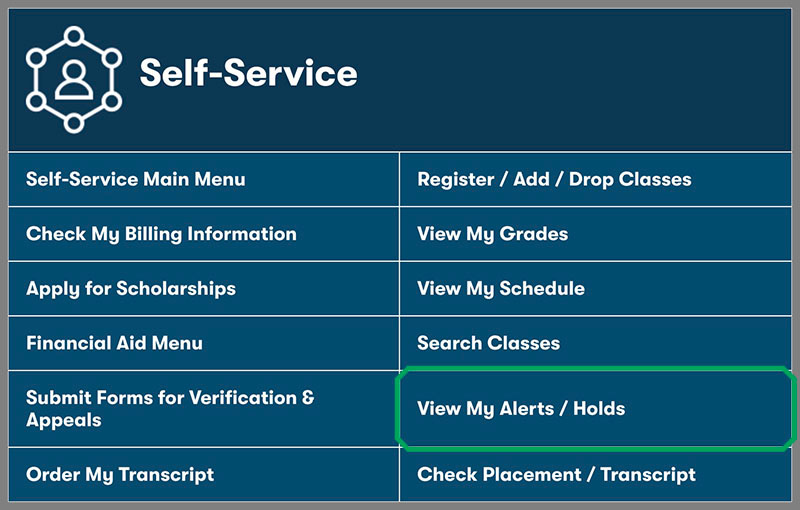 View holds or alerts on your student account through your myNMC page.
- A “Hold” listed below may keep you from registering for classes.
- View the “Processes Affected” column to see what this hold prevents you from doing.
- Contact the appropriate office (telephone number listed under “Hold Type”) to see what is needed to clear the hold.
- Student Financial Services
- Do you have a financial hold for a balance due NMC?
- Check your financial aid status (Satisfactory Academic Status - SAP)
- If suspended, visit Financial Services : Financial Aid Appeals.
- Complete your FAFSA for the 2024-25 aid year at Federal Student Aid
- If you will be at least 21 on or before August 23, 2024, and fit the other eligibility requirements, apply for Michigan Reconnect.
- Check out our NMC scholarships at Financial Services : Scholarships.
Questions?
Real People Here to Help
Fill out the form below and an Admissions staff member will be in touch.